Get started with Bill Pay solution
View the core steps required to perform the initial setup for the Bill Pay solution
Journey overview
The diagram below represents the overall activity flow when using Bill Pay. You can manage bills, suppliers, and payment methods in different ways and order.
We will take you through each of these elements so that you can build the flow that suits you and your customers best.
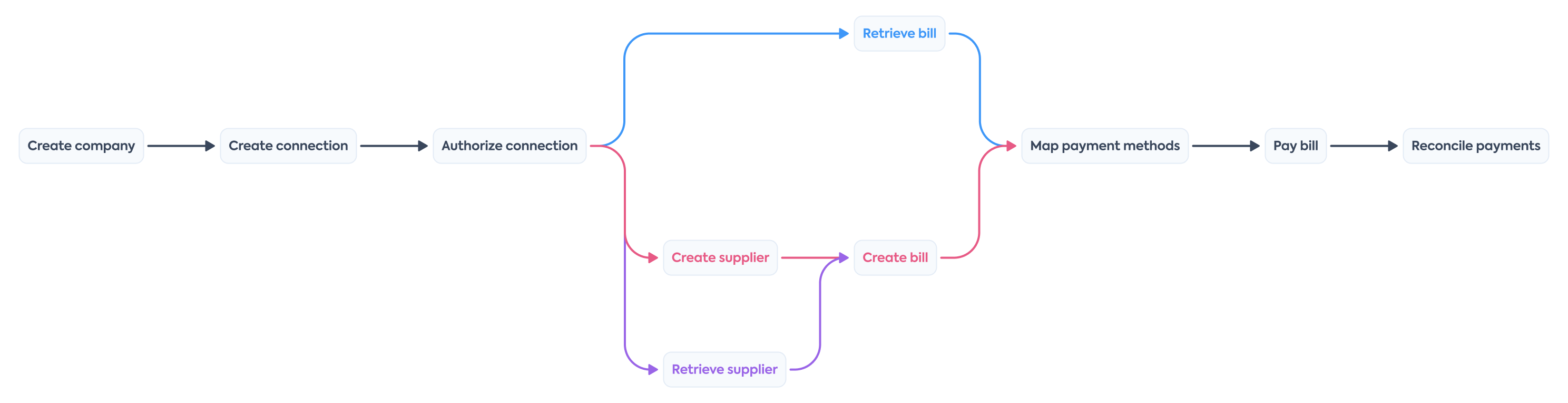
Once you decide to build with Bill Pay, you need to configure Codat accordingly. Let's go through these requirements in detail.
Enable Bill Pay
- Open the Codat Portal and sign in.
- Click on Settings > Organizational settings > Products.
- In the list of products, find Bill Pay and click Enable. Then, follow the on-screen prompt.
Configure Bill Pay
Data types
In the Codat Portal, navigate to Settings > Integrations > Data types. Enable the data types required for Bill Pay and set them to Fetch on first link:
| Data sourceData source An external platform (such as QuickBooks, Xero, or a bank) that Codat integrates with to pull or push financial data. | Data types |
|---|---|
| Accounting | bankAccountsbillsbillPaymentschartOfAccountscompanypaymentMethodssuppliers |
Configure the solution to refresh data when you need it by setting a synchronization frequency on the same screen. We recommend setting it to a daily or a monthly syncSync The process of fetching the latest data from a connected data source. Syncs can be triggered manually or run automatically on a schedule..
Manage data sourcesData source An external platform (such as QuickBooks, Xero, or a bank) that Codat integrates with to pull or push financial data.
In the Codat Portal, navigate to Settings > Integrations and click Manage integrations. Next, click Manage next to the specific integration you want to enable and set it up to serve as a data sourceData source An external platform (such as QuickBooks, Xero, or a bank) that Codat integrates with to pull or push financial data. for the solution.
You can also view detailed configuration instructions by clicking on the relevant tile:


Authorization flow
As part of using Bill Pay, you will need your customers to authorize your access to their data. To do so, use Link - our pre-built, embeddable, conversion-optimized, and white-labeled authorization flow.
The solution lets you tailor the authorization journey to your business needs. You can:
WebhooksWebhook An automated notification sent from Codat to your application when specific events occur, such as when data syncs complete or connections change status.
Codat supports a range of event types you can listen to that help you manage your data pipelines. In the Codat Portal, navigate to Settings > WebhooksWebhook An automated notification sent from Codat to your application when specific events occur, such as when data syncs complete or connections change status. > Configure consumer and click Add endpoint to add webhookWebhook An automated notification sent from Codat to your application when specific events occur, such as when data syncs complete or connections change status. consumer endpoints, or learn more about the Webhook service at Codat.
We recommend listening to the following event types to make the most of Bill Pay:
-
read.completed.initialListen to this event to track the completion of the initial read of data types for a specific companyCompany In Codat, a company represents your customer's business entity. Companies can have multiple connections to different data sources.. When you receive a message from this webhookWebhook An automated notification sent from Codat to your application when specific events occur, such as when data syncs complete or connections change status., verify the payload before proceeding to the next steps of the bill pay process.
-
read.completedThis event indicates the read of data types has completed. This applies both to reads of changes to existing data and reads of new data records. You should then refresh the data in your platform.
-
bill.write.successfulandbill.write.unsuccessfulListen to these events to track the completion of the bill pay operation in the SMBSMB The primary customer segment that Codat helps businesses serve, typically companies with annual revenues under $500 million.'s accounting software.
You may also want to listen to client.rateLimit.reached and client.rateLimit.reset events to track your request count to Codat's APIAPI A set of rules and protocols that allows different software applications to communicate with each other. Codat provides APIs for accessing financial data from accounting, banking, and commerce platforms. in relation to your allocated quota.
Client libraries
Use our comprehensive Bill Pay libraries to kick-start and simplify your build. Simply install the library in one of the supported languages and pass your base64-encoded APIAPI A set of rules and protocols that allows different software applications to communicate with each other. Codat provides APIs for accessing financial data from accounting, banking, and commerce platforms. key to the constructor.
- TypeScript
- Python
- C#
- Go
Install
NPM
npm add @codat/sync-for-payables
Yarn
yarn add @codat/sync-for-payables
Initialize
import { CodatSyncPayables } from "@codat/sync-for-payables";

const payablesClient = new CodatSyncPayables({
  authHeader: "Basic BASE_64_ENCODED(API_KEY)",
});
Install
pip install codat-sync-payables
Initialize
from codat_sync_for_payables  import CodatSyncPayables
from codat_sync_for_payables .models import operations, shared

payables_client = CodatSyncPayables(
    security=shared.Security(
        auth_header="Basic BASE_64_ENCODED(API_KEY)",
    ),
)
Install
dotnet add package Codat.Sync.Payables
Initialize
using Codat.Sync.Payables;
using Codat.Sync.Payables.Models.Shared;
using Codat.Sync.Payables.Models.Operations;

var payablesClient = new CodatSyncPayables(authHeader: "Basic BASE_64_ENCODED(API_KEY)");
Install
go get github.com/codatio/client-sdk-go/sync-for-payables
Initialize
import (
	"context"
	syncforpayables "github.com/codatio/client-sdk-go/sync-for-payables/v2"
	"github.com/codatio/client-sdk-go/sync-for-payables/v2/pkg/models/shared"
)

func main() {
	payablesClient := syncforpayables.New(
		syncforpayables.WithSecurity(shared.Security{
			AuthHeader: "Basic BASE_64_ENCODED(API_KEY)",
		}),
	)
}
You have enabled Bill Pay, set up the relevant integrations, configured auth flow parameters, and noted the recommended webhooksWebhook An automated notification sent from Codat to your application when specific events occur, such as when data syncs complete or connections change status.. This completes the initial setup of the solution.
Next, you will create a companyCompany In Codat, a company represents your customer's business entity. Companies can have multiple connections to different data sources. and its connectionConnection A link between a Codat company and a data source (like an accounting platform). Each connection represents authorized access to pull or push data from that platform. to build out the core infrastructure required to manage accounts payable with Codat.
Read next
- Set up your SMB customer for Bill Pay's solution to continue building your AP management process.
- Check out our client libraries to kickstart your Bill Pay build.